1
 2
 3
 4
 5
 6
 7
 8
 9
10
11
12
13
14
15
16
17
18
19
20
21
22
23
24
25
26
27
28
29
30
31
32
33
34
35
36
37
38
39
40
41
42
43
44
45
46
47
48
49
50
51
52
53
54
55
56
57
58
59
60
61
62
63
64
65
66
67
68
69
70
71
72
73
74
75
76
77
78
79
80
81
82
83
84
85
86
87
88
89
90
91
92
93
94
95
96
97
98
99
100
101
102
103
104
105
106
107
108
109
110
111
112
113
114
115
116
117
118
119
120
121
122
123
124
125
126
127
128
129
130
131
132
133
134
135
136
137
138
139
140
141
142
143
144
145
146
147
148
149
150
151
152
153
154
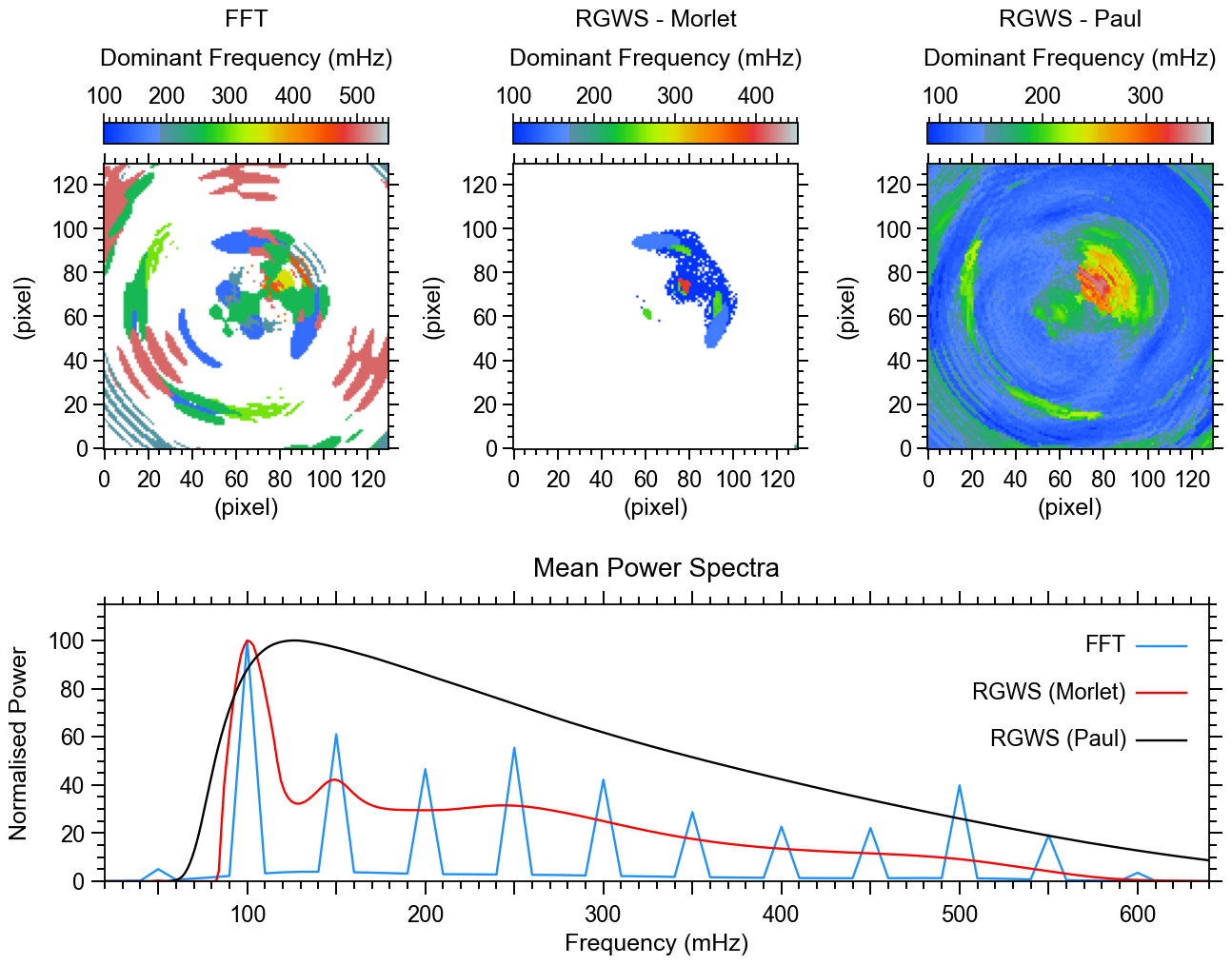
155 | import matplotlib.pyplot as plt
import numpy as np
from matplotlib.ticker import AutoMinorLocator
from matplotlib.colors import ListedColormap
from mpl_toolkits.axes_grid1 import make_axes_locatable
from mpl_toolkits.axes_grid1.inset_locator import inset_axes
# Set up the figure layout
fig = plt.figure(figsize=(12.8, 10))
# Top row: 3 squared images
positions_top = [
[0.079, 0.484, 0.234, 0.4], # Left image
[0.415, 0.484, 0.234, 0.4], # Center image
[0.755, 0.484, 0.234, 0.4] # Right image
]
# Define visualization parameters
xticks_labels = ['0', ' ', '40', ' ', '80', ' ', '120']
# Load the RGB values from the IDL file and create the color map
rgb_values = np.loadtxt('Color_Tables/idl_walsa_powercolor_1.txt')
rgb_values[0,:] = [255.0,255.0,255.0]
rgb_values[255,:] = [0.,0.,0.]
rgb_values = rgb_values / 255.0
idl_colormap = ListedColormap(rgb_values)
# Setting global parameters
plt.rcParams.update({
'font.family': 'sans-serif', # Use sans-serif fonts
'font.sans-serif': 'Arial', # Set Helvetica as the default sans-serif font
'font.size': 19, # Global font size
'axes.titlesize': 20, # Title font size
'axes.labelsize': 18, # Axis label font size
'xtick.labelsize': 17, # X-axis tick label font size
'ytick.labelsize': 17, # Y-axis tick label font size
'legend.fontsize': 15, # Legend font size
'figure.titlesize': 19, # Figure title font size
'axes.grid': False, # Turn on grid by default
'grid.alpha': 0.5, # Grid transparency
'grid.linestyle': '--', # Grid line style
'font.weight': 'medium', # Make all fonts bold
'axes.titleweight': 'medium', # Make title font bold
'axes.labelweight': 'medium' # Make axis labels bold
})
plt.rc('axes', linewidth=1.3)
plt.rc('lines', linewidth=1.7)
# Plot the three snapshots in the top row
for i in range(3):
if i == 0:
im = FFT_dominant_frequency*1000 # Convert to mHz
colorbar_label = 'FFT\nDominant Frequency (mHz)'
elif i == 1:
im = Morlet_dominant_frequency*1000 # Convert to mHz
colorbar_label = 'RGWS - Morlet\nDominant Frequency (mHz)'
else:
im = Paul_dominant_frequency*1000 # Convert to mHz
colorbar_label = 'RGWS - Paul\nDominant Frequency (mHz)'
ax = fig.add_axes(positions_top[i]) # Create each subplot in specified position
DF = ax.imshow(WaLSA_histo_opt(im), cmap=idl_colormap, aspect='equal', origin='lower', vmin=im.min(), vmax=im.max())
# Configure axis ticks and labels
ax.tick_params(axis='both', which='both', direction='out', top=True, right=True)
ax.set_xticks(np.arange(0, 130, 20))
ax.set_yticks(np.arange(0, 130, 20))
ax.tick_params(axis='both', which='major', length=8, width=1.4) # Major ticks
ax.tick_params(axis='x', which='major', pad=8) # Major ticks
ax.tick_params(axis='both', which='minor', length=4, width=1.4) # Minor ticks
ax.xaxis.set_minor_locator(AutoMinorLocator(4))
ax.yaxis.set_minor_locator(AutoMinorLocator(4))
ax.set_xlabel('(pixel)')
ax.set_ylabel('(pixel)', labelpad=12)
# Create an inset color bar axis above the plot
divider = make_axes_locatable(ax)
cax = inset_axes(ax, width="100%", height="7.5%", loc='upper center', borderpad=-2.1)
cbar = plt.colorbar(DF, cax=cax, orientation='horizontal')
# Move color bar label to the top of the bar
cbar.set_label(colorbar_label, labelpad=16, linespacing=2)
cbar.ax.tick_params(direction='out', top=True, labeltop=True, bottom=False, labelbottom=False)
cbar.ax.xaxis.set_label_position('top')
# Adjust tick marks for the color bar
cbar.ax.tick_params(axis='x', which='major', length=7, width=1.2, direction='out', top=True, labeltop=True, bottom=False)
cbar.ax.tick_params(axis='x', which='minor', length=4, width=1.2, direction='out', top=True, bottom=False)
# Set colorbar ticks and labels
cbar.ax.xaxis.set_major_formatter(plt.FuncFormatter(lambda x, _: f'{int(x)}'))
# Set minor ticks
cbar.ax.xaxis.set_minor_locator(AutoMinorLocator(10))
# Define the range of the color bar and set major ticks at intervals of 100
tick_min = np.floor(DF.get_clim()[0])
tick_max = np.ceil(DF.get_clim()[1])
major_ticks = np.arange(np.ceil(tick_min / 100) * 100, tick_max + 1, 100)
cbar.set_ticks(major_ticks)
cbar.ax.xaxis.set_major_formatter(plt.FuncFormatter(lambda x, _: f'{int(x)}'))
# Bottom row: 1D signal plot filling the entire row
ax1d = fig.add_axes([0.08, 0.08, 0.906, 0.291]) # [left, bottom, width, height]
ax1d.plot(FFT_frequencies*1000, FFT_averaged_power_normalized, color='DodgerBlue', label='FFT')
ax1d.plot(Morlet_frequencies*1000, Morlet_averaged_power_normalized, color='Red', label='RGWS (Morlet)')
ax1d.plot(Paul_frequencies*1000, Paul_averaged_power_normalized, color='Black', label='RGWS (Paul)')
ax1d.set_title('Mean Power Spectra', pad=21)
ax1d.set_xlabel('Frequency (mHz)', labelpad=5)
ax1d.set_ylabel('Normalised Power', labelpad=12)
ax1d.set_xlim([20, 640])
ax1d.set_ylim(0, 115)
# Set tick marks outside for all four axes
ax1d.tick_params(axis='both', which='both', direction='out', top=True, right=True)
# Custom tick intervals
xtick_positions = range(50, 650, 50) # Major tick marks every 50
xlabel_positions = range(100, 700, 100) # Labels every 100
ax1d.set_xticks(xtick_positions)
labels = [str(pos) if pos in xlabel_positions else '' for pos in xtick_positions]
ax1d.set_xticklabels(labels)
ax1d.set_yticks(np.arange(0, 115, 20))
# Custom tick sizes and thickness
ax1d.tick_params(axis='both', which='major', length=10, width=1.4, pad=5) # Major ticks
ax1d.tick_params(axis='x', which='major', pad=8) # Major ticks
ax1d.tick_params(axis='both', which='minor', length=6, width=1.4) # Minor ticks
# Set minor ticks
ax1d.xaxis.set_minor_locator(AutoMinorLocator(5))
ax1d.yaxis.set_minor_locator(AutoMinorLocator(4))
# Add custom labels manually to the plot .... to align the labels to the right
handles, labels = ax1d.get_legend_handles_labels()
# Define the vertical offset for each legend item
offset = 0.17
for i, (handle, label) in enumerate(zip(handles, labels)):
# Add the colored line
ax1d.plot(
[0.935, 0.98], # x coordinates (start and end of the line)
[0.85 - offset * i, 0.85 - offset * i], # y coordinates (constant to make it horizontal)
transform=ax1d.transAxes,
color=handle.get_color(), # Use the color from the original handle
linestyle=handle.get_linestyle(), # Use the linestyle from the original handle
linewidth=handle.get_linewidth(), # Use the linewidth from the original handle
)
# Add the label text
ax1d.text(
0.925, 0.85 - offset * i,
label,
transform=ax1d.transAxes,
ha='right', va='center', fontsize=17,
)
#--------------------------------------------------------------------------
# Save the figure as a single PDF
pdf_path = 'Figures/Fig4_dominant_frequency_mean_power_spectra.pdf'
WaLSA_save_pdf(fig, pdf_path, color_mode='CMYK')
plt.show()
|